
If you forgot your WhatsApp Chat Lock secret code, the official recovery option is Settings > Privacy > Chat lock > Unlock and clear locked chats. This removes the code but deletes messages and media in locked chats; recovery depends on a backup created before the chats were cleared.
This guide will walk you through simple, step-by-step solutions to regain access including how to handlewhatsapp gold chat secret codes, how to unlock hidden whatsapp chat, and details on the whatsapp group lock feature official. We’ll cover both official WhatsApp and WhatsApp Gold, so you can get back to your chats in no time.
What Happens When You Forget Your WhatsApp Chat Lock Secret Code?
Secret codes for WhatsApp chat lock are designed to add an extra layer of privacy, but they’re easy to forget. For users of WhatsApp Gold, the issue can be trickier, as WhatsApp Gold chat secret codes often come with extra customization options that differ from the official app.
If you forget the code, a few things happen:
- You cannot open the locked folder through normal chat access.
- Fingerprint, face unlock, or device PIN may still open Chat Lock only if the app is set to use biometric unlock—but this does not “reset” or reveal the secret code.
- Hidden locked chats do not reappear just because you reopen WhatsApp.
- On official WhatsApp, no “forgot password” button emails you the code.
- The built-in recovery path clears the secret code, but also clears the locked chats themselves.
Check for Quick Workarounds
Before diving into more detailed steps, try these quick fixes. They work for both official WhatsApp and WhatsApp Gold, and often resolve the issue without extra effort:
- Use Biometric Authentication: If you enabled fingerprint or face ID for chat lock, you can bypass the secret code entirely. Simply open WhatsApp, navigate to the locked chats folder, and use your fingerprint/face to unlock it.
- Try Your Device Passcode: Many users link their WhatsApp chat lock secret code to their phone’s passcode. If you forgot your custom secret code, try entering your phone’s PIN, pattern, or password.
- Restart the App/Device: Sometimes, a simple restart can resolve glitches that prevent the secret code prompt from working correctly, especially if you recently updated to the gold whatsapp latest version.
How to Recover Access in Gold WhatsApp
On official WhatsApp, there is only one supported recovery method. On WhatsApp Gold, recovery depends on the mod version.
Fix 1: Reset Secret Code on Official WhatsApp
The official WhatsApp app has a built-in way to reset your chat lock secret code, but it will delete your chat history. This method also applies if you’ve forgotten the code for locked group chats, as the whatsapp group lock feature official uses the same secret code as individual chat locks. Here’s how to do it:
- Open WhatsApp on your device and tap the “Settings” icon.
- Select “Privacy” from the settings menu. This is where all chat lock settings are located.
- Scroll down and tap “Chat Lock”.
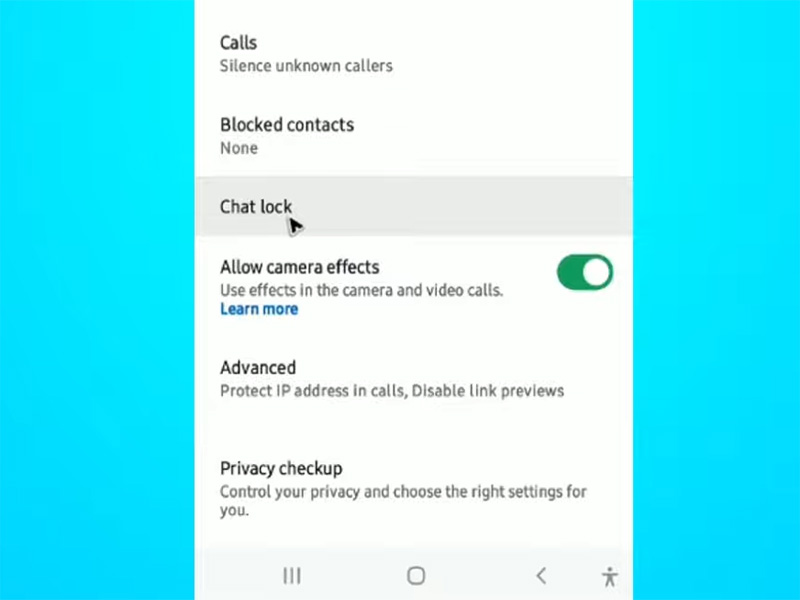
- Tap “Secret Code”.
- Select “Reset Secret Code”. You’ll be prompted to authenticate using your device’s biometrics or passcode.
- Enter a new secret code, confirm it, and tap “Done.” Your old secret code is now replaced, and you can use the new one to unlock your chats.
Notice: WhatsApp documents this exact recovery path in its official Help Center. The operation clears the secret code and deletes the contents of locked chats, so check your backup status before proceeding.
Fix 2: Unlock WhatsApp Gold Chat Lock
If you use WhatsApp Gold and forgot your whatsapp gold chat secret codes, the process is slightly different. Since it’s a modded app, the settings are often more customizable. First, ensure you’re using the gold whatsapp latest version, as older versions may not have the reset feature or may have security bugs. Here’s how to reset your secret code and unlock hidden chats:
- Open the gold whatsapp latest version on your Android device.
- Tap the three vertical dots (menu icon) in the top-right corner, then select “Settings.”
- Scroll to “Privacy” or “Chat Lock”.
- Look for the “WhatsApp Gold Chat Secret Codes” optionand tap it to access reset settings.
- Select “Reset Secret Code” and authenticate using your device’s biometrics or passcode.
- Set a new secret code, confirm it, and save your changes. You can now use this new code to unlock your locked chats.
How to Unlock Hidden WhatsApp Chats When You Remember the Code
Forgetting your secret code often goes hand-in-hand with not knowing how to unlock hidden whatsapp chat. Whether your chats are hidden in the official app or WhatsApp Gold, here’s how to reveal and unlock them after resetting your secret code:
How the Official WhatsApp Group Lock Feature Works
WhatsApp’s Secret Code announcement explains that hidden locked chats can be found by entering the secret code in the search bar. This method requires the code; it is not a recovery method for a forgotten code.
- Open WhatsApp and scroll down to the bottom of your chat list. You’ll see a “Locked Chats” folder.
- Tap the folder and enter your new secret code to unlock it.
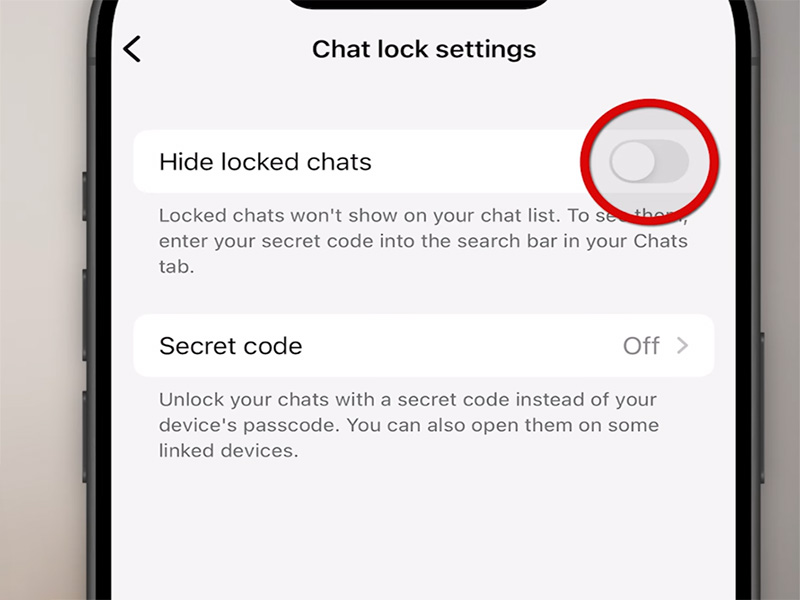
- Your hidden chats will now be visible, and you can access them normally. To hide the folder again, go to “Chat Lock Settings” and toggle “Hide Locked Chats”.
Official WhatsApp Chat Lock is mainly designed for individual chats. About groups:
- You can lock group chats individually if the version supports it.
- There is no separate “group lock password” different from your chat lock secret code.
- If you forget the code, group chats inside the locked folder are affected the same way as private chats.
- Biometric unlock may open them if enabled, but it does not recover the code.
So “group lock” on official WhatsApp is not a different system—it is the same Chat Lock applied to a group conversation.
WhatsApp Gold Chat Secret Codes: What Can Be Verified?
WhatsApp Gold offers extra hidden chat features, so how to unlock hidden whatsapp chat may require an extra step:
- Open the gold whatsapp latest version and tap the search bar at the top.
- Enter your new whatsapp gold chat secret codes.
- Your hidden chats folder will appear. Tap it to access your locked conversations.
- To unhide chats permanently, go to “Chat Lock Settings” and toggle off “Hide Chats” for specific conversations.
With WhatsApp Gold, fewer things can be “verified” because it is not an official client. You can verify:
- Whether your installed Gold version has a reset option.
- Whether locked chats still exist in the hidden folder.
- Whether a local/Gold backup exists.
- Whether the publisher’s guide mentions showing hidden chats.
Consult the instructions provided by the app’s publisher, such as its guide to showing hidden chats on WhatsApp Gold.
Can You Restore Messages After Clearing Locked Chats?
Yes, you may be able to restore messages after clearing locked chats, but only if you have a suitable backup.
WhatsApp’s official Chat Lock instructions explain that cleared chats can be restored when the most recent backup was created before the chats were cleared.
For example, imagine you created a backup on October 10 and used the Unlock and Clear option on October 15. If that backup contains the relevant conversations, it may allow you to recover the content saved as of October 10. Messages exchanged after the backup may not be available through that restoration.
Do not assume that a backup exists simply because automatic backups are enabled. Confirm the most recent backup information available in the app and the account associated with it.
Important Tips to Avoid Forgetting Secret Codes
To prevent this frustration from happening again, follow these simple tips—especially if you use WhatsApp Gold:
- Link to Your Device Passcode: When setting a secret code, link it to your phone’s passcode. This way, you won’t have to remember a separate code.
- Update to Gold WhatsApp Latest Version: The gold whatsapp latest version includes improved chat lock features, including password recovery options that older versions lack.
- Note Down Your Secret Code: Write down your secret code in a secure placeor use a password manager to store it.
- Test the Code Regularly: Every few weeks, unlock your chat lock to refresh your memory. This prevents forgetting the code over time.
- Use Biometrics as Backup: Always enable fingerprint/face ID for chat lock as a backup for when you forget your secret code.
Key Notes About WhatsApp Gold & Chat Lock Security
While WhatsApp Gold offers extra features like custom whatsapp gold chat secret codes and enhanced hidden chat options, it’s important to note:
- WhatsApp Gold is a modded app, so always download the gold whatsapp latest version from a trusted source.
- Unlike the whatsapp group lock feature official, WhatsApp Gold’s group lock may have different steps—check the app’s settings for group-specific lock options.
- Backup your chats regularly to avoid losing data if you need to reinstall the app after resetting your secret code.
FAQ:
Q: How can I recover a forgotten WhatsApp Chat Lock secret code without deleting messages?
A: There is no guaranteed official method to recover a forgotten hidden-chat code without clearing the affected chat contents. If you are using Gold WhatsApp, there is a possibility of recovery, depending on the specific version.
Q: How do I unlock a hidden WhatsApp chat when the Locked Chats folder is missing?
A: If you remember the code, tap the search bar and enter the secret code. The hidden chat should appear. On WhatsApp Gold, also check the mod’s hidden-chat or privacy menu.
Q: Can I use my fingerprint to open WhatsApp locked chats without the secret code?
A: Yes, if fingerprint/facial recognition was already enabled for Chat Lock.
Q: Does the official WhatsApp group lock feature support group conversations?
A: Yes, individual group chats can be locked if your WhatsApp version supports Chat Lock. However, there isn’t a separate group-lock code. The same Chat Lock secret code applies.
Q: How do I reset WhatsApp Gold chat secret codes in the Gold WhatsApp latest version?
A: Open the Gold menu > Privacy/Chat Lock settings > reset secret code or disable chat lock. Always check whether your hidden chats are still listed before confirming.
Q: Can I restore WhatsApp locked chats after selecting Unlock and clear?
A: Only if you have a backup made before clearing. Go to Settings > Chats > Chat backup, then reinstall WhatsApp and restore.
Conclusion
Forgetting the secret code on your WhatsApp chat lock is a common issue, but it’s easily fixable. By resetting your secret code, you can regain access to your locked chats and learn how to unlock hidden whatsapp chat with ease. Remember to use the whatsapp group lock feature official for added privacy on group conversations, and keep your whatsapp gold chat secret codes secure but memorable.
With these tips, you’ll never be locked out of your private WhatsApp chats again. If you’re using WhatsApp Gold, always stick to the latest version for the best security and chat lock functionality.


