WhatsApp allows users to easily share messages, photos, videos, links, documents, and other content with contacts. However, the forwarding feature has some limits, and the WhatsApp forward limit may make it less convenient when sending the same message to multiple chats at once.
Gold WhatsApp is often seen as a modified version of WhatsApp, offering greater control over standard functions. One of the most talked-about features is the ability to increase the maximum number of reposts. Instead of selecting only a few chat contacts each time, users can forward the same content to more chat contacts in one operation.
Previously, we shared the ways to set up security on Gold WhatsApp web. This guide will explain how WhatsApp’s forwarding function works, the specific meaning of the regular limits, how increasing the forwarding limit changes the workflow, and things to note when using this feature in Gold WhatsApp.

What Is the WhatsApp Forward Limit
WhatsApp’s forwarding limit specifies the number of chat partners that can be selected when forwarding the same message. This move aims to reduce large-scale forwarding and make regular sharing processes more controllable.
For ordinary users, this means that if they want to forward a message to a large number of contacts, they may need to do it in batches: first select a chat group within the allowed number of contacts to send the message, then return to the original message and repeat the above operation. This process is closely related to the WhatsApp Business forward messages limit, which affects how businesses and users manage large-scale message sharing while keeping each forwarding action within the platform’s set range.
This operation is simple for two or three contacts; however, if the same message needs to be sent to a large number of people, the process becomes cumbersome and laborious.
The Truth About WhatsApp Forward Limits
People often misunderstand the specific scope of WhatsApp forwarding restrictions.
Forwarding limits are not the same as the overall limit on the number of people who can receive messages; they mainly refer to the “forwarding” operation and the number of chat sessions that can be selected simultaneously within that operation.
Changing forwarding limits will not automatically change other WhatsApp restrictions. Group size limits, broadcasting functionality, media file restrictions, and other WhatsApp features all operate independently.
The restrictions may differ between the standard version of WhatsApp and the modified version. For example, “WhatsApp Gold” may offer options not available in the standard version, but the specific settings and the number of forwards allowed depend on the specific version used.
Therefore, if forwarding limits are relaxed, it is best to view this as a specific, customized feature rather than assuming that all restrictions regarding message sharing have been lifted.
Why Increase the Forward Limit
Setting a higher forwarding limit can be useful when you frequently share the same information with multiple people.
1. Save Time
The biggest advantage is that it reduces repetitive work.
If you need to send a short notification to 15 contacts, selecting more contacts at once means fewer forwarding operations and you don’t need to frequently go back to view the original message.
2. Share Updates More Quickly
Increasing the limit makes it easier to share time-sensitive content. This is very useful for event information, work updates, invitations, reminders, or other messages that need to be sent to multiple chat sessions.
3. Reduce Repeated Steps
Repeated forwarding operations often require multiple clicks per batch; increasing the number of available recipients can reduce these repetitive steps.
4. Make Large Contact Lists Easier to Manage
For people who frequently need to communicate with numerous contacts, a higher limit may make WhatsApp message forwarding more convenient. This eliminates the need to treat each small group of contacts as a separate task, allowing users to process more recipients simultaneously and manage large-scale communication more efficiently.
Gold WhatsApp Forwarding Limit vs Standard WhatsApp
The biggest difference is the amount of control offered during forwarding.
| Feature | Standard WhatsApp | Gold WhatsApp with Increased Limit |
| Forward messages | Yes | Yes |
| Select multiple chats | Yes | Yes |
| Higher forwarding limit | Limited by the standard app | May be available |
| Fewer forwarding rounds | Not always | More likely |
| Extra forwarding settings | Limited | Depends on the version |
| Customization | Basic | More options may be available |
The important point is that Gold WhatsApp does not necessarily have one fixed forwarding system across every release. Different versions can offer different settings.
How to Increase the Forward Limit in Gold WhatsApp
The specific steps depend on the version of Gold WhatsApp and its menu design, but the process is generally similar.
Step 1: Open Gold WhatsApp
Launch Gold WhatsApp and open the main chat screen.
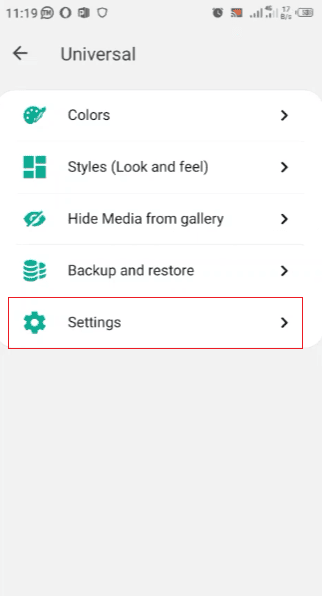
Step 2: Open the Settings Menu
Tap the menu button and enter the settings area. Look through sections related to chats, messages, privacy, or extra settings.
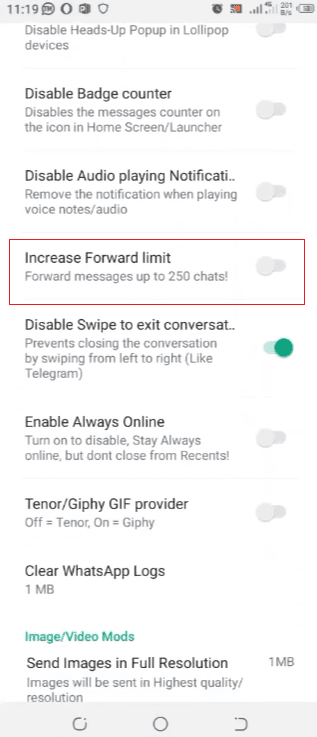
Step 3: Find the Forwarding Option
Find options related to message forwarding, forwarding limits, or the number of chats available.
The specific wording may vary between different versions. Some versions may use a shorter name, while others may include the setting in a more extensive customization menu.
Step 4: Select a Higher Limit
If this version provides a value selector or similar control, please select the value you wish to use.
Avoid changing multiple settings at the same time. Adjust one of the options first; this will make it easier to observe whether the forwarding behavior has changed.
Step 5: Save the Setting
Some versions will apply the changes immediately, while others may require you to confirm your selection or restart the application.
Step 6: Test the Forward Function
Open the conversation and select a message. Click “Forward” to see the number of chats you can currently select.
If the selection screen displays the new number, the setting has taken effect.
How to Forward a Message to More Chats
Once the increased limit is active, the actual forwarding process remains familiar.
1. For Text Messages
Find the text message you want to share, select it, and then click the “Forward” option. Select the target chat session and send the text message.
2. For Photos and Videos
Open the conversation containing the media file. Select the photo or video, choose Forward, and pick the chats that should receive it.
3. For Documents
The same basic operations also apply to PDFs, various types of files, and other supported documents. Select the document, choose “Forward”, and then select the target chat session.
4. For Links
If you frequently share website links, the forwarding feature will be very useful because you won’t need to copy and paste the same link in every conversation.
Increasing the forwarding limit is especially useful when the same content needs to be sent to multiple different chat partners.
When a Higher Forward Limit Is Most Useful
Not every WhatsApp user needs a higher forwarding limit. This feature is most useful when you need to frequently share the same content with multiple individual chat partners.
1. Work Updates
If you need to send the same short update to multiple colleagues, selecting multiple chat sessions can reduce the need for repeated forwarding.
2. Event Invitations
Invitation information may need to be sent to friends, family, or different groups of people. Raising the limit can speed up this process.
3. Study Groups
Students may need to share notes, reminders, schedules, or links with several classmates.
4. Community Messages
If you manage a small community and frequently need to share the same information in different conversations, a larger selection cap can reduce repetitive work.
5. Personal Updates
Even simple matters such as itinerary details, meeting locations, or family plans may involve multiple separate chat conversations.
Does Increasing the Limit Change the Original Message
No. Adding a forwarding limit refers to the number of chat records selected during the forwarding process.
It does not rewrite or change the content of the original message.
For example, if you forward a message saying:
Meeting starts at 3 PM.
The content remains the same when you send it to additional chats. The main change is how many chats you can select during the process.
Does a Higher Limit Make Forwarding Faster
This speeds up the overall process because it reduces the number of forwarding rounds you need to complete.
The time saved depends on the number of recipients and how Gold WhatsApp manages this setting. For large group messaging, increasing the selection range under the WhatsApp forward limit can improve efficiency, while small chats may see little difference.
This feature is primarily designed to reduce the number of steps users need to take, rather than changing the fundamental way WhatsApp delivers messages.
Common Problems With the Forward Limit Setting
Sometimes users change settings but don’t see any noticeable changes. There are several reasons for this situation, all of which are quite simple.
1. The Option Is Not Available
Not all Gold WhatsApp versions include the same customization options. If a setting cannot be found, it means that the version may not include that feature.
2. The Setting Has Not Been Applied
Some versions may require you to save your changes or restart the application for the changes to take effect.
3. The Limit Applies Only to Certain Actions
A certain setting may affect regular message forwarding without changing other sharing functions. Therefore, it is essential to test the specific operation you want to perform.
4. The Menu Has Changed
If you are referring to an older tutorial, the name of this option may be different, or it may be located in another settings section.
Gold WhatsApp Increase Forward Limit: Is It Worth Using
For users who rarely forward messages, raising the forwarding limit may not make much sense, since sending content to one or two conversations is already quite fast.
However, this feature would be very useful for users who frequently share the same message with multiple different conversations. Its main advantages are obvious: it reduces the number of forwarding rounds and also reduces the number of repeated clicks.
This feature is especially helpful for those who frequently need to share announcements, links, files, event details, or other information to a large number of independent conversations.
Final Thoughts
Gold WhatsApp has increased the forwarding limit, making it easier to share the same content with more chat contacts at once. Users can handle more conversations in a single forwarding process instead of repeatedly selecting recipients. This change also relates to the WhatsApp message sending limit per day, helping users manage message sharing more efficiently.
The specific options depend on the version of Gold WhatsApp, so the name and location settings may vary. Once this option is available and enabled, its main advantage is obvious—it allows you to select more chat partners when forwarding, making repeated sharing more convenient and time-saving.